Postat 25 majMaj 25 Mycket roligt att följa ditt akvarium. Alla har vi våra olika sätt att nå framgång men viktigast är att det är en sysselsättning som kan ge fantastisk belöning. Sitter ofta framför burken och ser hela tiden nya saker som händer. Fisk som är borta veckovis och som dyker upp och uppträder som om inget har hänt.Jag har varit i hobbyn sedan sjuttiotalet och kommer nog att få med mig burken i graven.
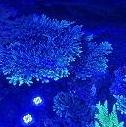
Postat 21 juniJun 21 Författare On 2026-05-25 at 21:44, tomaskk skrev:Mycket roligt att följa ditt akvarium. Alla har vi våra olika sätt att nå framgång men viktigast är att det är en sysselsättning som kan ge fantastisk belöning. Sitter ofta framför burken och ser hela tiden nya saker som händer. Fisk som är borta veckovis och som dyker upp och uppträder som om inget har hänt.Jag har varit i hobbyn sedan sjuttiotalet och kommer nog att få med mig burken i graven.Hej hej ursäkta att jag svarar så sent, men jag jobbar mycket på sistone och är inte så ofta på forum.Jag håller absolut med om allt du har skrivit.Detta är en väldigt givande hobby, själv så växte jag upp i tonåren med akvarium på 80 talet, på den tiden sötvatten fram tills nu med saltvatten.Jag kommer att vara med så länge jag kan .JAG KAN PASSA PÅ OCH UPPDATERA LITE 😉Det är som jag säger till min sambo att akvariet för mig är den bästa medicinen mot allt.Den bästa bästa tiden är på morgonen, dem första 2 timmarna efter jobbet när jag slappnar av på soffan och väntar när ljuset tänds på i akvariet.Det är denna tiden så jag verkligen slappnar av det ger mig så sååååå mycket, jag bara älskar vattenrörelsen i det blå ljuset.Mina fiskar som varje dag långsamt kommer fram och nyfiket hälsar på framför glaset.Den andra bästa tiden är på kvällen, fast omvänd belysning som långsamt dämpas ner och alla mina kolonierav sol koralen (Tubastraea ) vaknar. Det är många på baksidan, väldigt fina kolonier som mer och mer kommer på framsidan.Just nu så försöker jag skapa balans mellan mina koraller och kirurger som har blivit ganska stora och kräver mer och mer plats att beta på.Detta betyder att jag försöker att hålla mig till ett ganska luftigt aquascape med några få större korall kolonier .Fördelar - bättre cirkulation, lugnare fiskar plus att det är helt i min smak.Det är lite svårt att visa men dom koraller som jag trimmar eller klipper är ganska stora och tar en del platsOch så kort film hur det ser ut i akvariet nuPlaner för framtiden som gäller i akvarium -Koraller - några fina stora kolonier luftigt aquascape (att vara glad med det som man redan har)Fiskar vill gärna skaffa mina favoriter kirurgerZebrasoma gemmatumZebrasoma rostratumzebrasoma scopas YellowDetta skulle innebära ökning från 7st kirurger till 10 eller 11st.För att introducera nya unga kirurger med de gamla skulle innebära raka vägen till misslyckande ,så jag grubblar vidare.Att bli av mina gamla för att skaffa nya ingår inte i planen, dem har varit med mig i några år nu och bandet mellan dem och mig är för starkt.Det finns ett vrasse Halichoeres ornatissimus som jag tycker om, kanske ett sådant.Och till dem största problemenGröna alger håralger, tror jag, som spridit sig från backglas till stenar särskild dem som är i skuggiga området.Än så länge så håller mina kirurger dem mer eller mindre under kontroll "som nyklippt gräs", det är för dem som i deras hemtrakter.Men får jag jag bestämma då vill jag gärna slippa det.Min Po4 ligger på 0,05 ppmMin No3 ligger på 2 ppm enligt sista mätning i onsdagsInnan så brukade jag dosera nitrat så att inte nolla den, har 2st Lps koraller men nu har jag slutat med extra dosering.Tänkte att mina alger är mer glada för det extra nitrat.Så nu doserar jag inte , bara observerar hur koraller och akvariet mår.Kanske kommer jag ha dino på besök haha.Skickade IPC till triton -Lab väntar på svar bli intressant att se.Andra problem som jag blev förvånad över så är det att jag faktiskt förlorade några koraller som jag haft några år bara för jag flyttade på dem.Men för det mesta så rullar det påFick precis svar från Triton-labJareks aquarium - 20.06.2026 (B-KRYnv3).pdfInget konstig där, så vad finns i vatten som skapar så stor obalans som gynnar just de gröna alger ?????Jag tror att jag kommer att skicka flera ipc tester till olika leverantör, kan vara intressant .Kanske man kommer på någon bra lösning, försöker att hålla mig borta från kemiska lösningar så länge jag kan , det åtgärdar inte grund orsaken till problemet utan fungerar bara som plåster över såret .Så även om mina kirurger håller dem under kontroll, så vinner alger plats mer och mer sten efter sten och det är mitt största problem just nu.(ännu konstigare att det är dem delar av stenarna eller område som är i skuggan ??????)Kanske kommer någon att säga att jag pillar för mycket (detta skapar obalans , delvis sant)Men med den takten som vissa koraller växer, skulle korallerna i akvariet kollapsa av sig själv i det begränsade utrymmet.Det är ett stort förändring som jag gjorde och upprätthåller under det sista året eller två.Det handlar om kolkälla och bakterierInnan så använde jag1 bakterier Brightwell Microbacter 7nu Bacto Reef Therapy2 Kolkälla Brightwell Reef biofuelnu ättika 6%Mina tankar går mot kolkälla ättika ????? fast mina Nitrater är väldigt låga? alger som konsumerar det mesta ?Det är nånting som inte stämmer ????Jag slutade med extra nitrat och jag kan försiktig säga att det har blivit lite bättre.Jag tittar när ljuset är inte på, då ser man bättre de gröna fläckarna på stenarna.Frågan är hur korallerna kommer att reagera på den ultra låga nitrat och vad som kommer att hända med fosfater.Ska växla fosfat remover Rowa Phos järnbaserat till aluminium baserat Al-99 mina BA(barium) och Si(silikat) ligger på max enligt Triton-LabNackdelen - aluminium baserat remover tar med sig Fluor och den behöver jag så den behöver doseras lite extra.Tyvärr men kemi inte min bästa sida.Kollade precis mina no3 nivå Hanna no3 HR visade 0,0 ppm fasen !!! slutade med extra dosering men räknade inte med att det kommer hamna på 0 så snabbt det blev 20 ml nitrat extra cirka 1ppm 1000l (salpeter)lösning.ska dosera 1ppm fram till onsdag sen ska jag mäta igen .Minskade ättika dosering från 6ml till 3ml /d. Po4 Hanna visade 0,07 .Refugium alger ser ganska bra ut.OK det är tredje dagen som jag försöker skriva färdigt .Nu lämnar jag tre korta filmer från idag så att man kan jämföra om några månader.MvhJarecki Jareks aquarium - 20.06.2026 (B-KRYnv3).pdf Ändrat 21 juniJun 21 av jarecki68
Postat 15 juliJul 15 Författare Måste bara berätta.Som jag har skrivit i min senaste uppdatering så har jag problem med några envisa alger .Mina kirurger håller dem under kontroll till vis del .För några dagar sedan så skaffade jag -2st Mespilia globulus1st Tripneustes gratillaJag är så positiv överraskad över hur bra alger ätare dem är .Riktigt bra jobbat hoppas att de kommer att fortsätta så.Jag fick limma vissa av dem mindre koraller så att minska risken att dem välter.Jag ska avvakta och observera lite och kanske köpa några till .Det är rätt bra om alger , men det ska räcka för alla.Dem ska inte svälta, även när dem värsta algerna är borta.Mvh Jarecki
Postat 15 juliJul 15 Jag har 3 Mespilia + 2 Diadema setosum i mitt 300 L- De växer så det knakarMVH Lasse
Postat 15 juliJul 15 Författare 2 timmar sedan, Lasse skrev:Jag har 3 Mespilia + 2 Diadema setosum i mitt 300 L- De växer så det knakarMVH LasseOtroliga djur kan ej klaga på deras aptit på alger ,kanske bli det flera av Mespilia hos mig med Lasse.Mvh Jarecki
Postat 15 juliJul 15 Författare 13 minuter sedan, Anton.Lindgren skrev:De möblerar om fint i karet också 😆 frags med plugg hamnar lite överallt!Japp det tänkte jag på ,limmade fast alla mindre koraller hoppas att det hjälper ,Mespilia ska vara den snällare varianten ,men man vet aldrig .MvhJarecki
Postat 27 juliJul 27 Författare Tillbaka efter en väcka i Polen.Min Mespilia globulus gjorde ett fantastiskt jobb !!!!! 🙂MvhJarecki
Postat 23 augustiAug 23 Författare HejEn liten uppdatering, som jag har skrivit sist så har jag haft problem med gröna alger som täckte stenar i skuggiga områden.Jag har inte löst själva källan till problemet men efter jag har köpt5st Tripneustes gratilla2st Mespilia globulus.efterAkvariet börjar förvandlas till att bli mycket fräschare och 60% av de störande alger blivit uppätna av Sjöborrarjag är bara så glad just nu !!!Vilka otroligt effektiva städare och roliga djur, de tar även röda kalk alger från stenen som jag tycker kan vara positivtför stenen (Minskad igen sättning).Det tillkommit en ny fisk medPseudocheilinus hexataenia vrasse !!!mvhJarecki Ändrat 23 augustiAug 23 av jarecki68
Postat 26 septemberSep 26 Författare Hungriga fiskar 🙂Ny medlem Halichoeres melanurus vrasseMvhjarecki






Gå med i konversationen
Du kan posta nu och registrera dig senare. Om du har ett konto, logga in nu för att posta med ditt konto.