Christian J
Stödjande medlem
-
Gick med
-
Senaste besök
All aktivitet
-
Jag tror det. Utrustningen (dubbel uppsättning) spolades med hett kranvatten efter varje flytt och fick sedan lufttorka (cirkulationspumparna plockades dessutom isär). Fisken fångades upp med en gallerkorg (som också spolades), troligen har några droppar vatten följt med varje gång (förutom vattnet på fiskens kropp) men det går ju knappast att undvika.
-
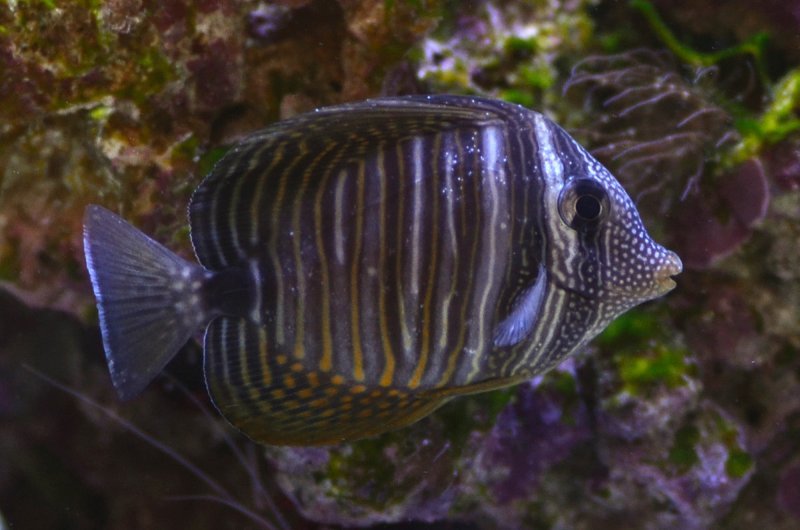
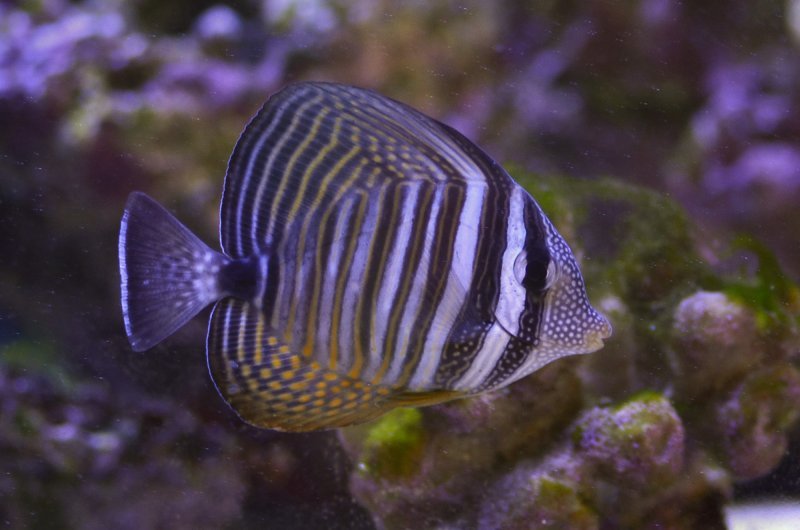
Kan detta vara något annat än Cryptocaryon? Akvariet har varit utan fisk i 10 veckor (inget annat nytt t ex sten har satts i under denna tid). Fisken behandlades med TTM i 3x3 dagar innan den släpptes i akvariet. Fisken idag, 7/6 2016: Som jämförelse, samma fisk för en vecka sedan:
-
Det kan tydligen bildas små bubblor på en ny sensor, vilket stör mätningen. Tydligen kan man undvika det genom att tvätta den med tvål och vatten.
-
På mina Tunze nanostream 6055 (inköpta år 2014 tror jag) kan man ändra utspänningen på nätaggregatet genom att byta små medföljande stift (jumper wires). Nytillverkade "electronic-streamers" verkar levereras med en Turbelle Controller istället för stift numera.
-
På vilket sätt upplevde du den som för klen? Har du samma erfarenhet, att skumningen upphör efter ett kort tag? Jag brukar få ca 1,5cm avskum i koppen, sedan är det tvärstopp tills jag rengör stigröret igen.
-
Vissa eremitkräftor är utmärkta algätare, t ex den lilla Clibanarius tricolor. Däremot rör de nog inte långa algtrådar, möjligen korta nya skott.
-
Min Tunze 9004 skummare fungerar bra direkt efter att jag gjort rent stigröret, men redan efter något dygn slutar den producera mer avskum, kanske beroende på att det då hunnit bildas en beläggning på insidan av stigröret. Jag brukar göra rent stigröret nästan dagligen, men det har jag aldrigt behövt göra med någon annan skummare. Skall detta tolkas som att skummaren är underdimensionerad för mitt akvarium? Akvariets vattenvolym är på ca 250 liter, och borde ha ganska låg belastning (innehåller bara lite levande, som jag matar ganska sparsamt).
-
Tunzes nyare skummare går tydligen att få med kontrollerbara DC-pumpar. Fördelen med detta skall vara att man slipper justera mängden luft med en ventil.
-
Här är kanske en prickmyt till (även om jag inte har läst studierna som citeras): http://www.lionfishlair.com/biology/ich.shtml (slutet av artikeln) Observera att denna teori inte handlar om immunitet hos fiskarna, utan om att Cryptocaryon-parasiten skulle dö ut trots att den lyckas infektera fisk.
-
Några teorier: - Den nya fisken hade dolda trophonter i gälarna, eller enstaka osynliga på det vita bröstet. En prickcykel kan som snabbast gå på drygt 6 dagar. - Frisimmande theronter eller protomonter kom in i ditt akvarium med vatten från akvarieaffären (var noga med att kasta allt vatten från affären!). - Du hade redan prick i akvariet som dina tidigare fiskar normalt skulle stått emot, men den nya fisken skapade sådan stress att samtligas immunförsvar försvagades. - Du hade redan prick i akvariet sedan tidigare inköp (tomonter kan följa med på t ex sten och dröja upp till ett par månader innan de kläcks), och skulle ha fått ett utbrott även om du inte släppt i den nya fisken. Om alla 5 verkligen blivit immuna så bör de inte kunna föra prick vidare, men akvariet kan trots det innehålla tomonter i ytterligare ett par månader (tills samtliga kläckts och misslyckats med att hitta en ny värd). Därefter kanske fiskarnas immunitet varar ytterligare 6 månader, så om du därefter sätter i en ny fisk som bär på prick från affären (t ex i osynligt i gälarna) så kan den nya fisken smitta de tidigare igen. Dessutom kanske inte immuniteten är lika effektiv mot alla stammar av prick... Eller så kanske UVC-behandlingen håller mängden prick på en låg nivå, som ständigt infekterar icke immuna fiskar på nytt men utan att det märks (t ex inuti gälarna), men när en ny fisk introduceras kanske den drabbas värre än de övriga pga stress. För att undvika stress skulle du kunna sätta den nya fisken i ett eget akvarium i ett par veckor så den får vila upp sig, och/eller i en bur i visningskaret där övriga fiskar inte kan störa den. Denna nya fisk kommer sedan också få prick i visningskaret, men kanske kunna leva med det på samma sätt som de övriga.
-
Jag får väl krypa till korset och erkänna att färsk levande sten kanske inte var någon god idé trots allt. Jag har aldrig haft så mycket algproblem i något av mina tidigare akvarier, dessutom följde det med Aiptasia. Visserligen fanns det mycket intressant mikroliv att studera de första månaderna, men det har nu i stort sett helt försvunnit. Algproblemen förvärrades troligen av att jag inte insåg behovet av fosfatbindare i tid, och att jag till en början nästan bara använde fiskar som algätare (vilka slogs ut av Cryptocaryon, varefter algväxten exploderade igen). Först nu över ett år senare kanske akvariet börjar komma i balans, förutom Cyano, bubbelalger och Aiptasia.
-
Kontrollera att pumpen verkligen hänger fritt i vattenbehållaren och inte vibrerar mot sidan, annars låter det väldigt högt. Man kan även placera vattenbehållaren inuti något ljudisolerande, kanske rentav klä in den i något?
-
Fiskodlingar i Kina verkar hårt drabbade: "Cryptocaryoniasis is categorized as a “Class II animal epidemic” in China" enligt https://parasitesandvectors.biomedcentral.com/articles/10.1186/s13071-016-1550-1 "Epidemics of Class II refer to those which can cause great economic losses and need to take strict measures to bring under control or exterminate them and avoid their spread." enligt http://www.asianlii.org/cn/legis/cen/laws/aeplotproc518/ Detta innebär förhoppningsvis mer forskning i Kina (mycket mer än vad akvariehobbyn skulle kunna motivera), vilket kanske leder till ett genombrott i behandlingen så småningom.
-
Här är ett citat till från samma sida: "two life stages of one strain of Cryptocaryon (trophonts, i.e., the feeding stage during which the parasite can be found on the fish, and tomonts) survived dormant for 4–5 months at 12°C (53.6°F), and, after the water temperature increased to 27°C (80.6°F), developed and infected fish (Dan et al. 2009)." Trophonter kan alltså överleva 4-5 månader (på fisken antar jag), men om det bara gäller under låga vattentemperaturer så borde det inte vara något problem för tropiska fiskar. Den ursprungliga studien av Dan et al verkar vara A technique for the preservation of Cryptocaryon irritans at low temperatures (ej gratis).
-
Ja om den håller vad den lovar så verkar Seachems egen Ammonia Alert både tillförlitligare och dessutom enklare att använda (eftersom den kan sitta i kontinuerligt). Som det är nu vet jag ju inte om verkligen allt ammonium bundits eller ej. Jag har inte hittat någon information om hur stor ammoniumbindningskapacitet Seachem Prime/Stressguard egentligen har. Kanske de rentav låter oss mata som vanligt under TTM-behandlingen utan att behöva oroa oss alls för ammonium?
-
Menar du protein från fodret eller från nedbrytning av fiskens egen muskelmassa pga svält? Utsöndras inget ammonium av det senare? Jag funderade på om själva Seachempreparatet kunde ge upphov till mätfel även i rent vatten, men det verkar inte så. För att undersöka saken tillsatte jag Stressguard till ammoniumfritt akvarievatten och väntade sedan ett dygn innan test (resultat: inget mätbart ammonium). Man kanske borde vänta tre dygn för att vara extra säker... TTM-behållaren är av PP-plast, den enda övriga utrustningen är en cirkulationspump, en värmare och en planteringskorg för trädgårdsdammar som gömställe åt fisken.
-
Nu mätte jag NH4 igen efter tre dagar i TTM-behållare #2, och testet visade återigen ca 0,5ppm! Förhoppningsvis är det bundet av Seachem Stressguard, men oavsett tyder det på att fisken (kirurg) fortsatt utsöndra precis lika mycket ammonium även efter minst 3-6 dagar utan foder. Låter det rimligt?
-
Nitrit bildas väl bara om det finns både ammonium och bakterier som kan omvandla det. Med ammoniumbindare borde det alltså inte vara något problem, men om man istället sänker pH manuellt och använder ett patronfilter i hinken kanske man får nitrit, ungefär som vid inkörningen av ett nytt akvarium? Det verkar enklare att använda ammoniumbindare...
-
Även Fosså/Nilsen skrev i Korallrevsakvariet (del 2 1989, vet ej om de ändrat uppfattning i senare böcker?) att fisksjukdomar inte är "något stort problem" i ett väl inkört akvarium med rätt foder, och att det är "mycket vanligt" att även fiskar med kraftiga parasitangrepp kurerar sig själva. Att ett akvarium är "väl inkört" kan man kanske bekräfta genom vattentester och att t ex känsliga koraller trivs, men vad som är "rätt foder" är kanske svårare att avgöra. Själv misstänker jag att jag förlorat många fiskar av rädsla för att utfodra för mycket.
-
Tack! Frågan är hur "may" skall tolkas i sammanhanget --att det är ett dokumenterat faktum, eller spekulation från författaren? Källan verkar vara "Cryptocaryon irritans Brown 1951, the cause of "white spot disease" in marine fish: an update" av Colorni, A. and P. Burgess 1997, men den har jag inte hittat på Internet ännu.
-
Hur låg temperatur kan vara lämpligt? Jag använder värmare nu, kanske helt i onödan...
-
Oj, den andra länken skulle vara http://ntur.lib.ntu.edu.tw/bitstream/246246/161524/1/29.pdf ("Immunization of grouper, Epinephelus coioides, confers protection against a protozoan parasite, Cryptocaryon irritans" av Apolinario V. Yambot, Yen-Ling Song). Jag har ändrat länken i inlägget nu. Dock handlar båda studierna om samma fiskart.
-
Ja just det.
-
Det bör gå utmärkt att byta oftare, så länge den totala behandlingstiden är minst 8 dygn (eftersom trophonter kan stanna på fisken upp till 7 dagar). Tre dygn är snarare den längsta tid fisken bör gå innan byte, eftersom parasiten behöver lite mer än tre dygn för att hinna återinfektera fisken. Samtidigt får man förstås väga in eventuell stress när fisken flyttas till en ny hink.
-
Finns det någon källa på detta? Jag har visserligen bara skumläst https://www.researchgate.net/publication/222410282_Immunization_of_grouper_Epinephelus_coioides_confers_protection_against_a_protozoan_parasite_Cryptocaryon_irritans och http://ntur.lib.ntu.edu.tw/bitstream/246246/161524/1/29.pdf men där hittade jag inget sådant. Tvärtom skriver studien i den andra länken: "The conferred immunity played a major role in preventing or limiting the adhesion, invasion, and development of C. irritans theronts on the skin of the immunized grouper."